Shortcodes Ultimate – Content Elements
Add 50+ shortcodes with live preview for tabs, accordions, buttons, FAQs, sliders and boxes.
Install in
🌟 Building new pages with Gutenberg?
Explore VovaBlocks, a focused collection of native marketing and content blocks from the creator of Shortcodes Ultimate.
➡️ About Shortcodes Ultimate
Shortcodes Ultimate is a WordPress shortcode plugin for adding tabs, accordions, buttons, FAQs, sliders, carousels, lightboxes, columns, boxes and other reusable content elements without coding. It is ideal for site owners who want richer content layouts and practical UI elements without switching to a full page builder.
Use Shortcodes Ultimate in the Block Editor, Classic Editor, widgets and template files. Generate shortcodes visually, preview the result before inserting it, and reuse the same elements across posts, pages and existing shortcode-based content.
Trusted by hundreds of thousands of WordPress sites, Shortcodes Ultimate helps you replace multiple single-purpose UI plugins with one maintained toolkit. Explore live examples
What you can build
With Shortcodes Ultimate, you can quickly add common WordPress content elements such as:
- Accordions and FAQ sections
- Responsive tabs
- CTA buttons and download buttons
- Boxes, notes and callouts
- Columns and layout helpers
- Sliders and carousels
- Lightboxes for images and custom content
- Post lists and dynamic content blocks
- Spoilers, toggles and expandable content
- Media embeds and visual content blocks
Instead of installing a separate plugin for every small content element, Shortcodes Ultimate gives you one maintained toolkit for everyday WordPress content tasks.
Works with modern and classic WordPress workflows
Shortcodes Ultimate works with the Block Editor, Classic Editor, widgets and template files. You can insert shortcodes manually, use WordPress shortcode blocks or use the built-in shortcode generator to configure elements visually.
This makes the plugin useful for:
- Site owners who want to improve content without coding
- Bloggers and affiliate publishers who need reusable CTA and content blocks
- Agencies and freelancers maintaining multiple WordPress sites
- Developers who want shortcode-friendly output in templates
- Existing sites with older content that already uses shortcodes
Why use Shortcodes Ultimate?
- 50+ ready-to-use WordPress shortcodes
- Visual shortcode generator
- Live preview
- Works with the Block Editor and Classic Editor
- Shortcodes can be used in posts, pages, widgets and template files
- Responsive elements that work with your theme
- Built-in Custom CSS editor
- Developer-friendly hooks and documentation
- Free version available on WordPress.org
- Pro version available for advanced shortcodes, extra styles and premium support
Why shortcodes still matter in WordPress
The WordPress Block Editor is great for visual content editing, but shortcodes are still useful when you need portable, reusable content elements that work across different parts of a WordPress site.
Shortcodes are especially helpful when you want to:
- Reuse the same content element in many posts or pages
- Add dynamic content inside widgets or templates
- Maintain older WordPress sites that already use shortcodes
- Work across Classic Editor and Block Editor workflows
- Add content elements without switching to a full page builder
- Keep common UI elements available through a simple text-based syntax
Shortcodes Ultimate is designed for these practical workflows. It gives you a large collection of ready-made shortcodes and a visual generator, so you do not need to write shortcode syntax manually unless you want to.
Free and Pro
The free version of Shortcodes Ultimate includes a large collection of useful shortcodes for everyday WordPress content tasks.
Shortcodes Ultimate Pro adds advanced shortcodes, additional styles, Content Slider, Pricing Table, Testimonials, Shortcode Creator, Elementor support and premium support.
Useful links
Written by Joobi from the project's own listing. See the source page
7.9.3
- Fixed stored XSS through Lightbox iframe sources. Thanks to Dmitrii Ignatyev for reporting.
- Fixed an Unsafe Features bypass affecting Button onclick attributes and Meta data. Thanks to vuxvinh for reporting.
- Fixed unauthorized post meta disclosure in the Meta shortcode. Thanks to vuxvinh for reporting.
- Fixed private post title disclosure in the Permalink shortcode. Thanks to Jacek Sowiński for reporting.
- Added post access checks to gallery slide data.
- Fixed a PHP deprecation notice in Tabs shortcode when global variables are not properly initialized. Forum topic
7.9.2
This update features security improvements and is recommended for all users
7.9.1
This update features security improvements and is recommended for all users
7.9.0
- Added the Conditional Content shortcode for displaying content based on visitor, date and time, request, post, and WooCommerce conditions.
- Fixed a fatal error in gallery shortcodes when image resizing fails. Forum topic.
- Fixed a PHP Warning in su_feed shortcode. Forum topic.
- Tested with WordPress 7.1
7.8.4
- Updated readme.txt
- Updated Freemius SDK
7.8.3
- Added a redirect option to the Countdown Timer shortcode, allowing visitors to be redirected to a specified URL after the countdown expires.
- Fixed a PHP warning in the shortcode generator when a shortcode definition does not include a description.
- Updated Freemius SDK.
7.8.2
- Fixed a JavaScript error (
_prelude.js:1 Uncaught Error: Cannot find module '5') that could prevent shortcodes from working. Sorry for the inconvenience this caused. - Fixed an issue where the Spacer shortcode was not displayed in the shortcode generator.
7.8.0 – 7.8.1
- Added Countdown Timer, a new Pro shortcode for creating high-impact launch, sale, event, and deadline timers. It helps draw attention to time-sensitive offers with animated digits, flexible date and time settings, customizable labels, separators, colors, spacing, and clear post-expiration behavior.
- Added wordpress.org Live Preview support. You can now preview the plugin right in your browser. Check it out now!
- Improved the Admin UI with small usability and polish updates.
- Fixed translation handling so all plugin strings are now translatable.
7.7.0
- Added Posts Grid, a new Pro shortcode for building friendly, responsive post layouts with less setup. Use it to query posts, pages, or custom post types; narrow results by taxonomy terms, authors, included or excluded posts, and keywords; then display everything as a grid or list with flexible columns, spacing, featured images, meta, excerpts, read more links, and AJAX or deep-link pagination.
- Improved Drop Cap shortcode compatibility with the Astra theme
- Fixed the Getting Started video on the plugin About page in the admin area
- Added new icons and other improvements to the Shortcode Generator
- The plugin is now fully translated into German (de_DE), Spanish (Spain) (es_ES), French (France) (fr_FR), Japanese (ja), Korean (ko_KR), Dutch (nl_NL), and Russian (ru_RU)
7.6.4
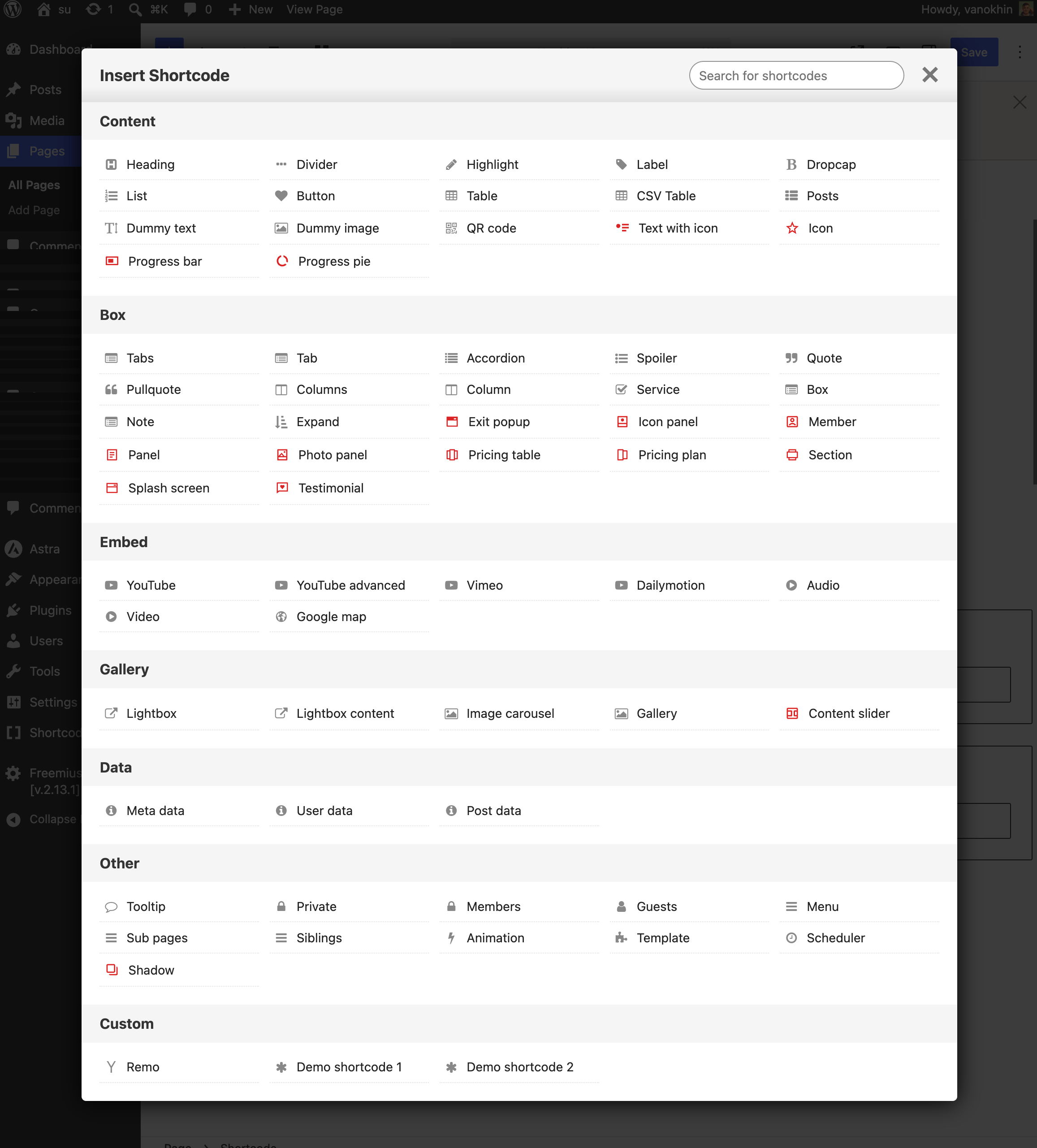
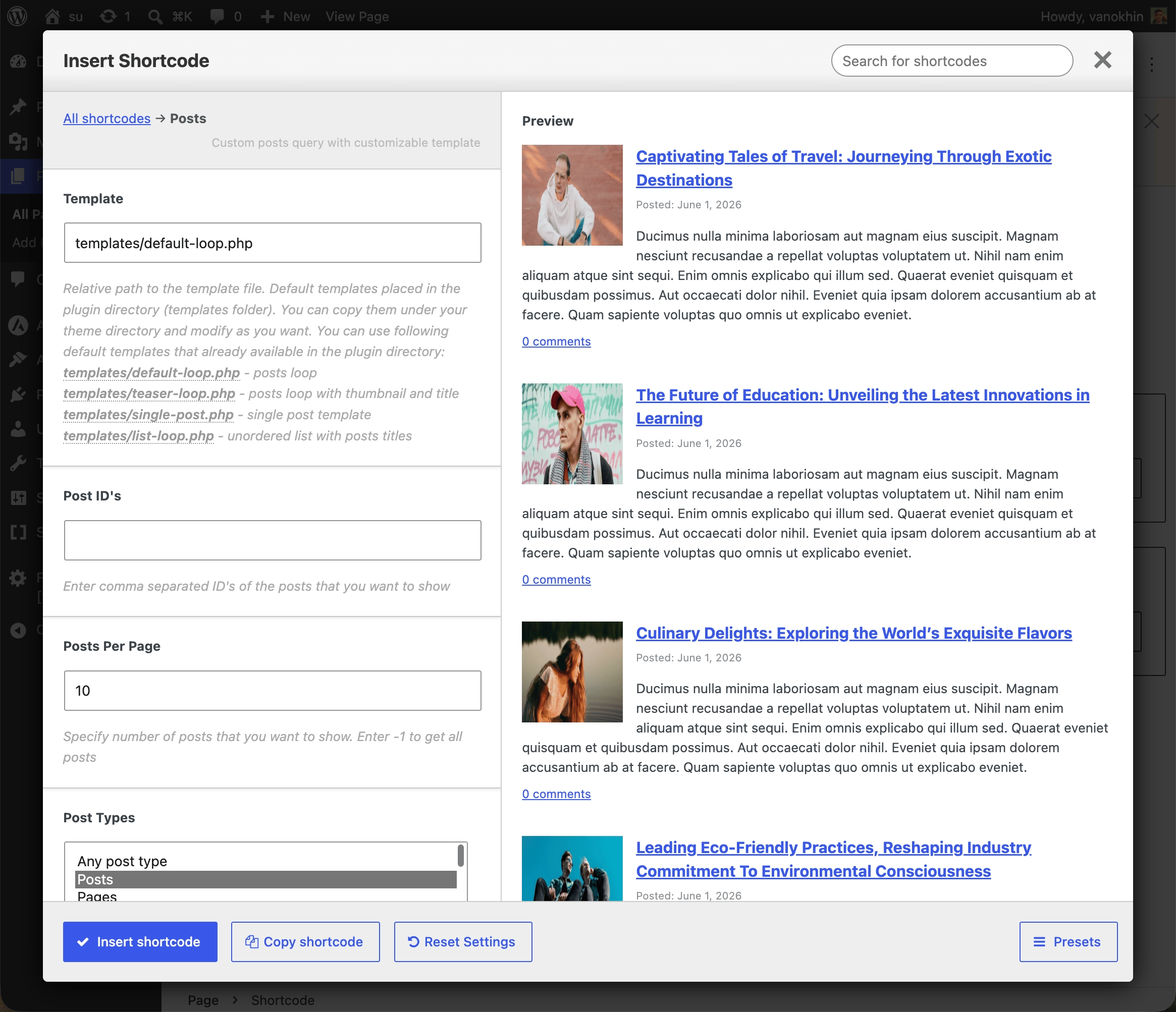
Big update for the Shortcode Generator tool!
I’ve improved the tool to make it even easier and more pleasant to use. It now includes an always-visible live preview, a grouped list of shortcodes, a reset settings button, a copy shortcode button, and many other helpful improvements.
With the new live preview, you can instantly see how your shortcode will look while changing the settings. The grouped shortcode list makes it easier to find the right option, and the new copy button helps you add shortcodes faster.
Take a look at the updated interface here:
PLUS:
- Fixed an issue in the Shortcode Generator preview where the Image Carousel showed an extra script
- Fixed an issue in the Shortcode Generator preview where the YouTube Advanced preview wasn’t working
- Updated plugin README.txt
7.5.3
- Fixed issue with missing
/freemius/folder
7.5.1
- Tested with WordPress 7.0
- Updated Freemius SDK
7.5.0
- Fixed “WP_Scripts::add was called incorrectly” notice on WordPress 6.9.1
- Improved input sanitization in several shortcodes
Older changelog entries are available in the changelog.txt file
Follow this listing's changes (Atom feed)